
Payment Types and Settlement Classes
Payment types are the tenders the payment window offers: Cash, Check, Visa, and whatever else your center records payments under. Each one can also carry a settlement class, which tells the reports whether a payment of that type brought money in or just moved it around. Set the classes once and the registers separate real cash from transfers, write-offs, and price adjustments.
Open Payment Types
Section titled “Open Payment Types”Click the gear icon on the top-right and select ‘Business’. On the left, under Financial, click ‘Payment Types’.
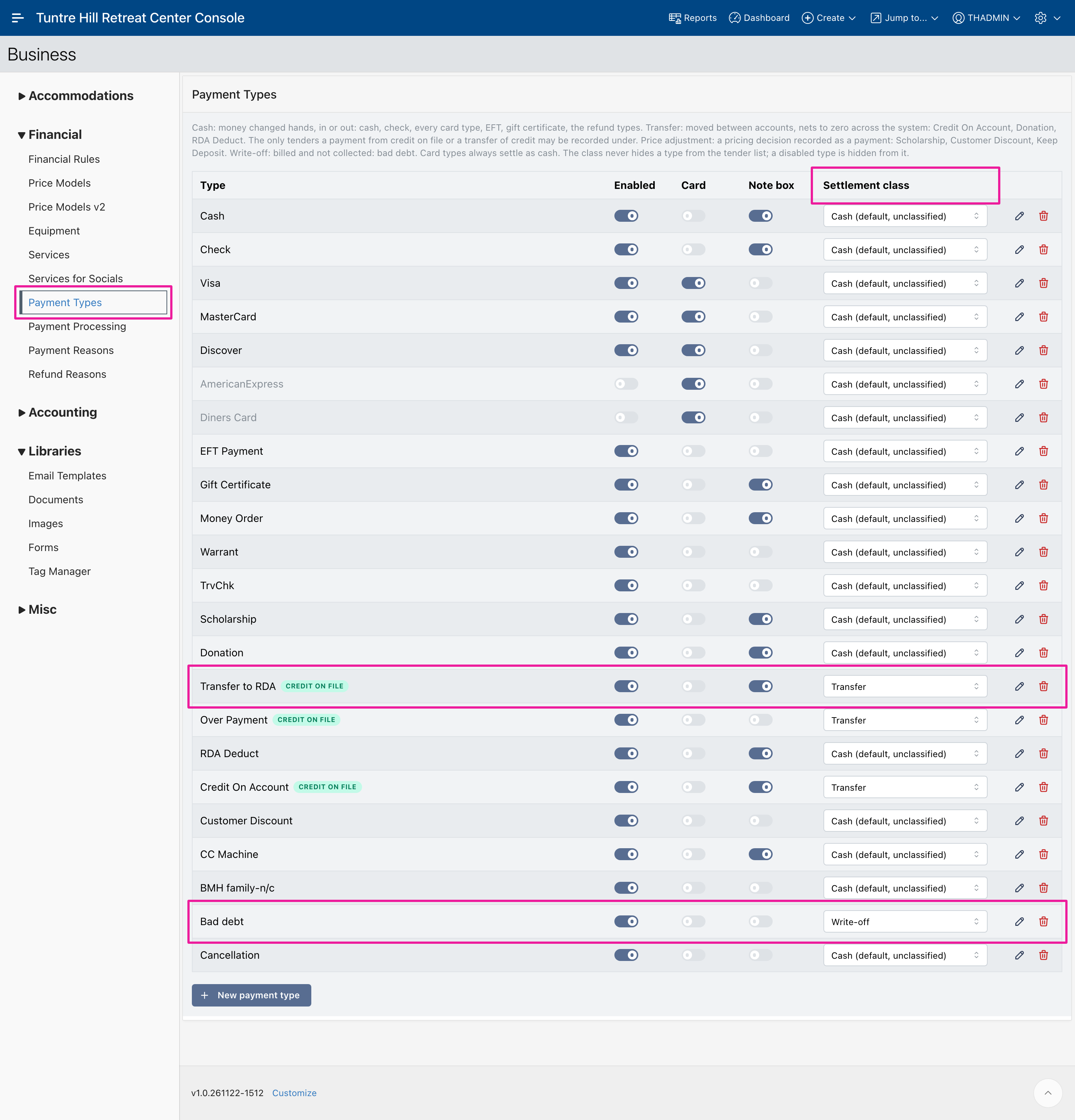
Each row is one type. ‘Enabled’ is whether it appears in the tender list; ‘Card’ marks the card brands, which open the card step in the payment window; ‘Note box’ is whether the window prompts for a check number or reference. The pencil renames a type and the trash can removes one that has never been used (disable it instead when it has). ‘New payment type’ adds one.
Pick a settlement class
Section titled “Pick a settlement class”‘Settlement class’ says what a payment under that type means:
- Cash — money changed hands, in or out. Cash, checks, every card brand, EFT, gift certificates. Every type starts here, so nothing changes until you classify something.
- Transfer — money moved between accounts and nets to zero across your books: Credit On Account, Over Payment, Transfer to RDA. A type classed Transfer is also the only tender a payment from credit on file can be recorded under; see Credit on File.
- Write-off — billed and not collected, such as a Bad debt type; see Write Off an Unpaid Balance.
- Price adjustment — a pricing decision that was recorded as a payment out of habit, such as Scholarship or Customer Discount. The better home for those is a deduction on the invoice; see Deduct a Charge.
Pick the class from the drop-down on the row; it saves straight away. The class never hides a type from the tender list, so staff keep recording the way they always have.
What the classes change
Section titled “What the classes change”Once any type is classed as something other than Cash, Daily Receipts groups the money methods under ‘Cash received’ with the deposit total, and puts transfers, write-offs, and price adjustments in their own sections below it. The program billing reports show ‘Paid’ as money and add ‘Transferred’, ‘Written off’, and ‘Price adjustments’ columns beside it when a program settled that way. A payment from credit on file no longer counts as cash coming in.
The processor, the service fee, and the donation option for each place a card is taken are on the next page down the left: Payment Processing Settings.