
Print the Room Attendant Worksheet
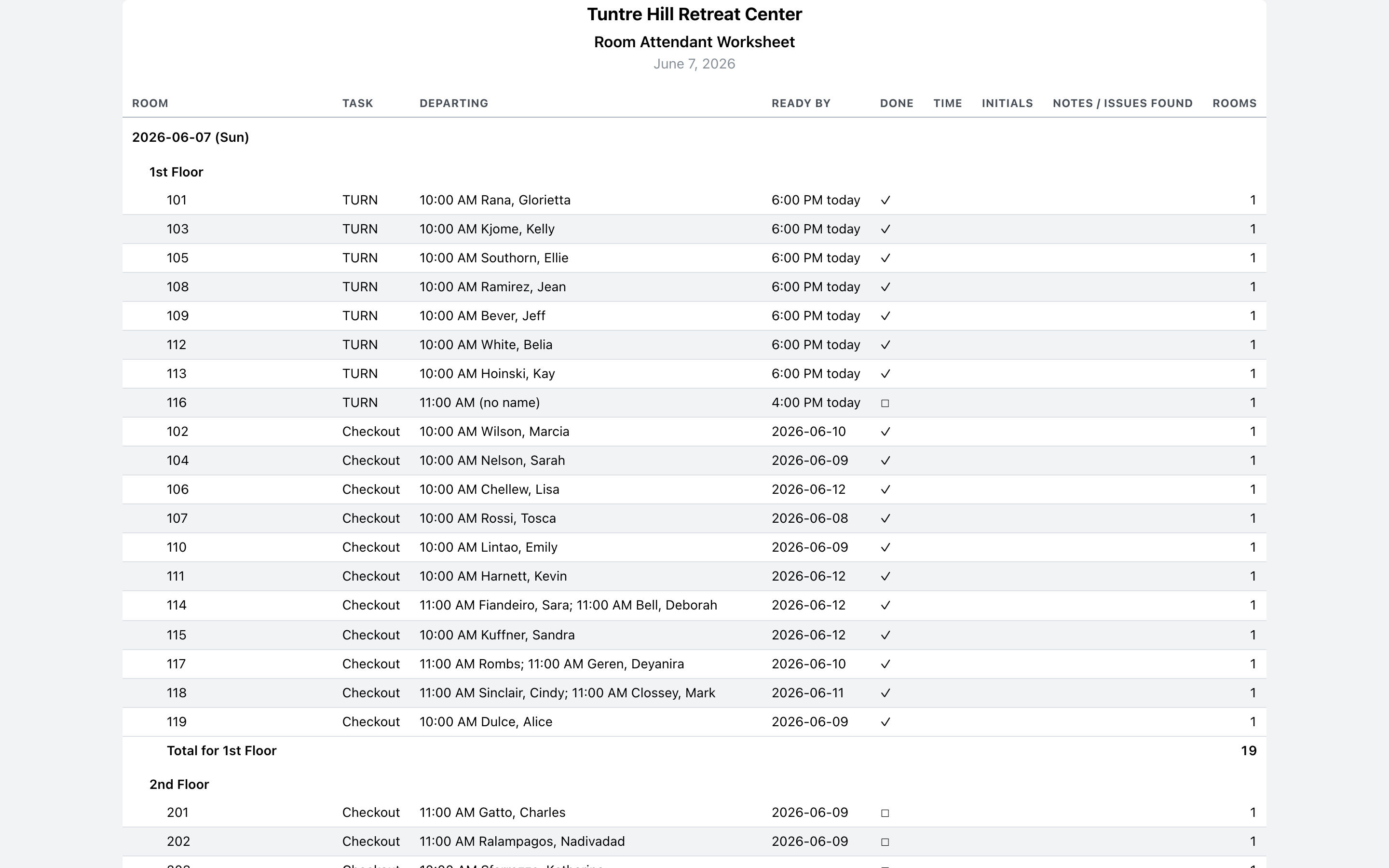
The Room Attendant Worksheet is the sheet that goes on the cart: only the rooms that need cleaning, with blank ‘Done’, ‘Time’, ‘Initials’, and ‘Notes’ columns to fill in by hand. At the end of the shift, the office keys the paper back into the board.
Open and print
Section titled “Open and print”Click ‘Printable Reports’ on the left, then ‘Housekeeping — Room Attendant’. Pick the day under ‘Days’ — today is preselected — and click the printer icon.
Read the worksheet
Section titled “Read the worksheet”Turns come first, then still-dirty rooms and checkouts, by room number within each. ‘Ready by’ is the deadline: the arriving guest’s time for a same-day turn (“6:00 PM today”), or the next arrival’s date when there’s breathing room. Rooms already checked off on the board print with a ✓ in ‘Done’; the rest have an empty box for the cleaner’s pen. The ‘Rooms’ count per room group at the bottom of each section is the cart and linen math.
After the shift
Section titled “After the shift”Bring the paper back and mark the ticked rooms cleaned on the board, so tomorrow’s worksheet starts clean and the front desk sees ready rooms.