
Reading the Board: What Every Field Means
A reference for everyone who looks at the Room Turnover board without working it every day — supervisors, the front desk, office staff. Use the panel on the right to jump to the badge or field you’re wondering about.
Where the board comes from
Section titled “Where the board comes from”The board is built from your reservations. Departures, arrivals, stayovers, next check-ins — all of it is derived, nothing is entered twice, and nothing you do here changes a booking. The one fact housekeeping records by hand is “this room is cleaned.” That’s why the board can show any date, past or future: the reservations already know.
The task badges
Section titled “The task badges”Each room card carries one badge, in the crew’s priority order:
- Turn today — one guest leaves and another arrives the same day. The room must be cleaned between the departure time and the arrival time; these sort first because they have a deadline.
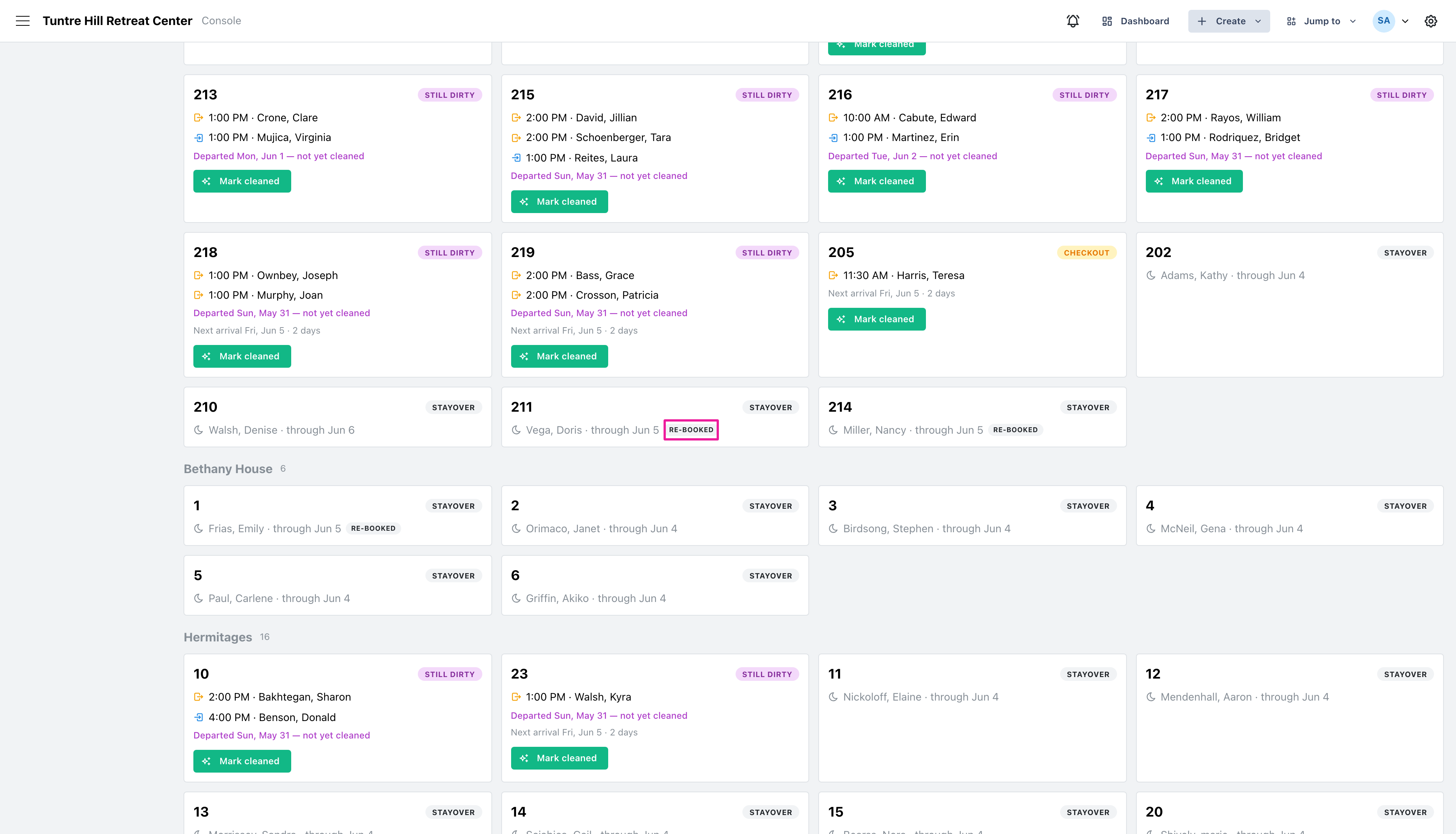
- Still dirty — the guest departed on an earlier day and the room was never marked cleaned. The card names the departure day. These sort right after turns, and one with an arrival today is just as urgent. See Still Dirty.
- Partial departure — a roommate left but someone is still in the room. Refresh around the stayover; it’s not a full turn.
- Checkout — a departure with nobody arriving today. ‘Next arrival’ shows how much breathing room there is.
- Arrival — a guest arriving into a room that’s ready. Nothing to clean; listed so the day is complete.
- Stayover — someone in residence all day. Shown for the full-house picture, with the date they stay through.
The re-booked badge
Section titled “The re-booked badge”Sometimes a guest’s stay is entered as two back-to-back reservations — a personal retreat, then a program, in the same room. Bookings show a departure and an arrival, but nobody actually leaves. The board understands this: the room shows as a stayover with a small ‘re-booked’ badge, there is no turn, and the room never appears in the cleaning counts. If the guest changes rooms between the two reservations, both rooms are real work again — the old room needs cleaning and the new one shows the arrival.
The counts and the progress bar
Section titled “The counts and the progress bar”Each chip at the top counts rooms, not guests, and doubles as a filter — click it to see only those rooms. ‘Same-day turns’ and ‘still dirty’ are the urgent ones; ‘still dirty’ only appears when there is something to catch up on, so most days it isn’t there at all. The ‘Cleaned’ bar tracks every room that needs cleaning today — departures plus any still-dirty catch-up — and reaching the end means the house is done.
Cleaned, undo, and other days
Section titled “Cleaned, undo, and other days”Marking a room cleaned records the time; clicking the button again undoes it. Checking off a past day’s room is normal — that’s how paper worksheets get keyed in, and how still-dirty rooms are cleared — and the cleaning is always recorded against the day the guest departed. Future days are view-only: the board shows the forecast, but a room can only be marked cleaned once its day has arrived.
For the front desk
Section titled “For the front desk”The thirty-second read when a guest is standing at the desk: find the room’s card. A green ‘Cleaned’ time means ready. ‘Mark cleaned’ still showing on a ‘Turn today’ or ‘Still dirty’ card with today’s arrival means the room needs chasing — those are the only two badges where an arriving guest and an uncleaned room meet. The ‘Next arrival’ line on checkout rooms tells you how many days the room can wait.