
Print the Check-in / Check-out Times Sheet
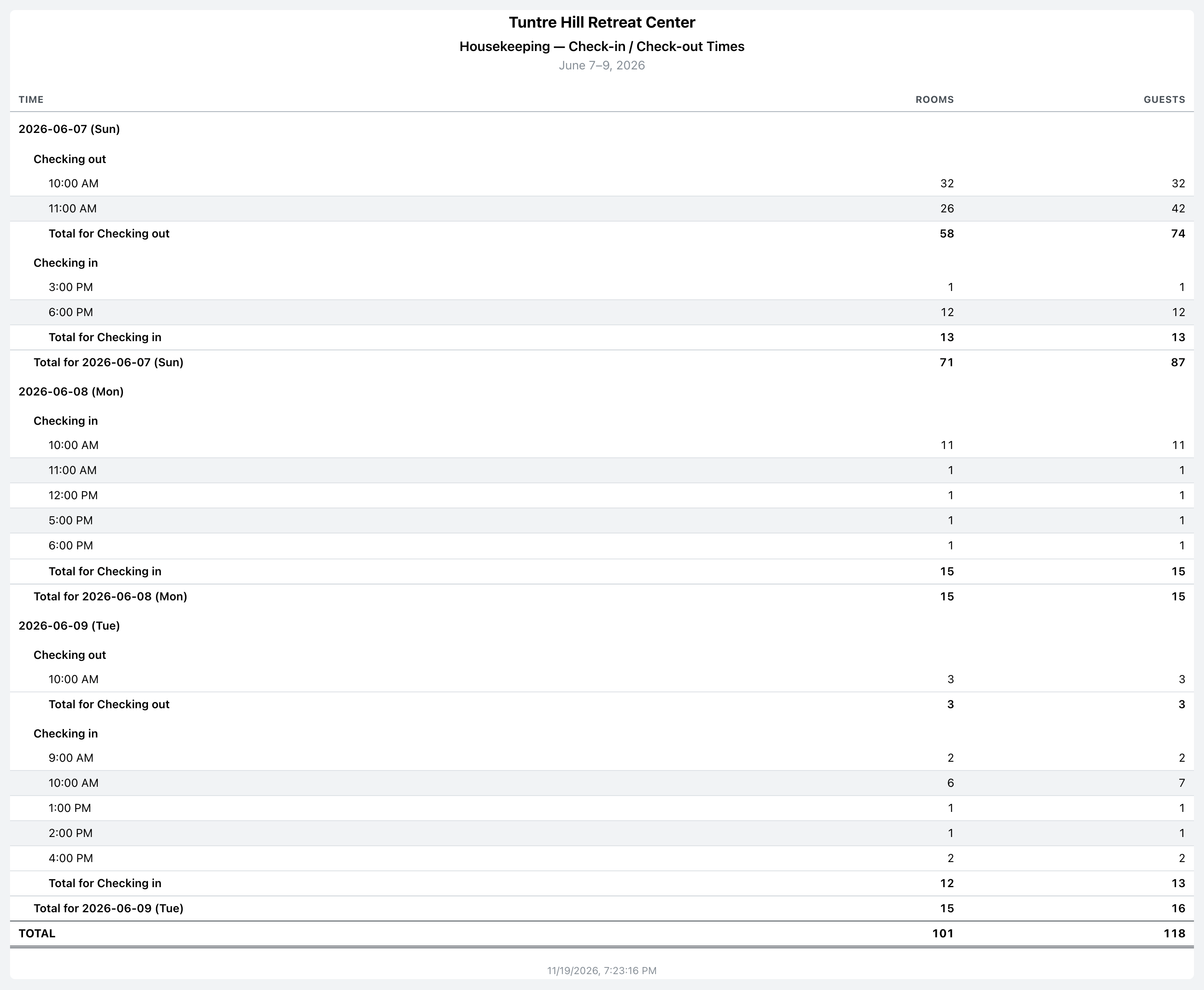
The Check-in / Check-out Times sheet counts rooms, not names: how many rooms check out at each time of day, and how many check in — so you can schedule the crew around the waves instead of a guest list. Print a month to plan the roster; the counts tie out to the Turnover Forecast, because both are built from the same reservations.
Open it
Section titled “Open it”Click ‘Printable Reports’ on the left, then ‘Housekeeping — Check-in / Check-out Times’. The same sheet also lives in the reports catalog — click ‘Reports’ on the top bar — in the Housekeeping section.
Pick the days
Section titled “Pick the days”The sheet opens on today. Click the date button under ‘Days’ to pick any single day or a range — up to a full month per run, the span for planning a roster.
Read it
Section titled “Read it”Each day splits into ‘Checking out’ and then ‘Checking in’ — the rooms empty before they fill — with one row per time of day and two counts: ‘Rooms’ and ‘Guests’. A big changeover day reads as its waves: thirty-two rooms out at 10:00 AM, twenty-six more at 11:00, then the afternoon’s arrivals — that’s where the crew needs to be, and when. Each side and each day carries its subtotal, and a day with no movement doesn’t print at all.
A shared room counts once per side: it checks out when its last guest leaves and checks in when its first guest arrives. Guests who commute, maintenance blocks, and a guest continuing in the same room are already left out, the same way the boards leave them out — so the room counts here match the forecast’s.
Print it
Section titled “Print it”Click the printer icon at the top — only the sheet prints. The icons beside it export the same sheet as a Word document or CSV file. For the wall-calendar version of the month, the Cleaning Calendar now prints too, from its own Print button.