
Plan the Week with the Cleaning Schedule
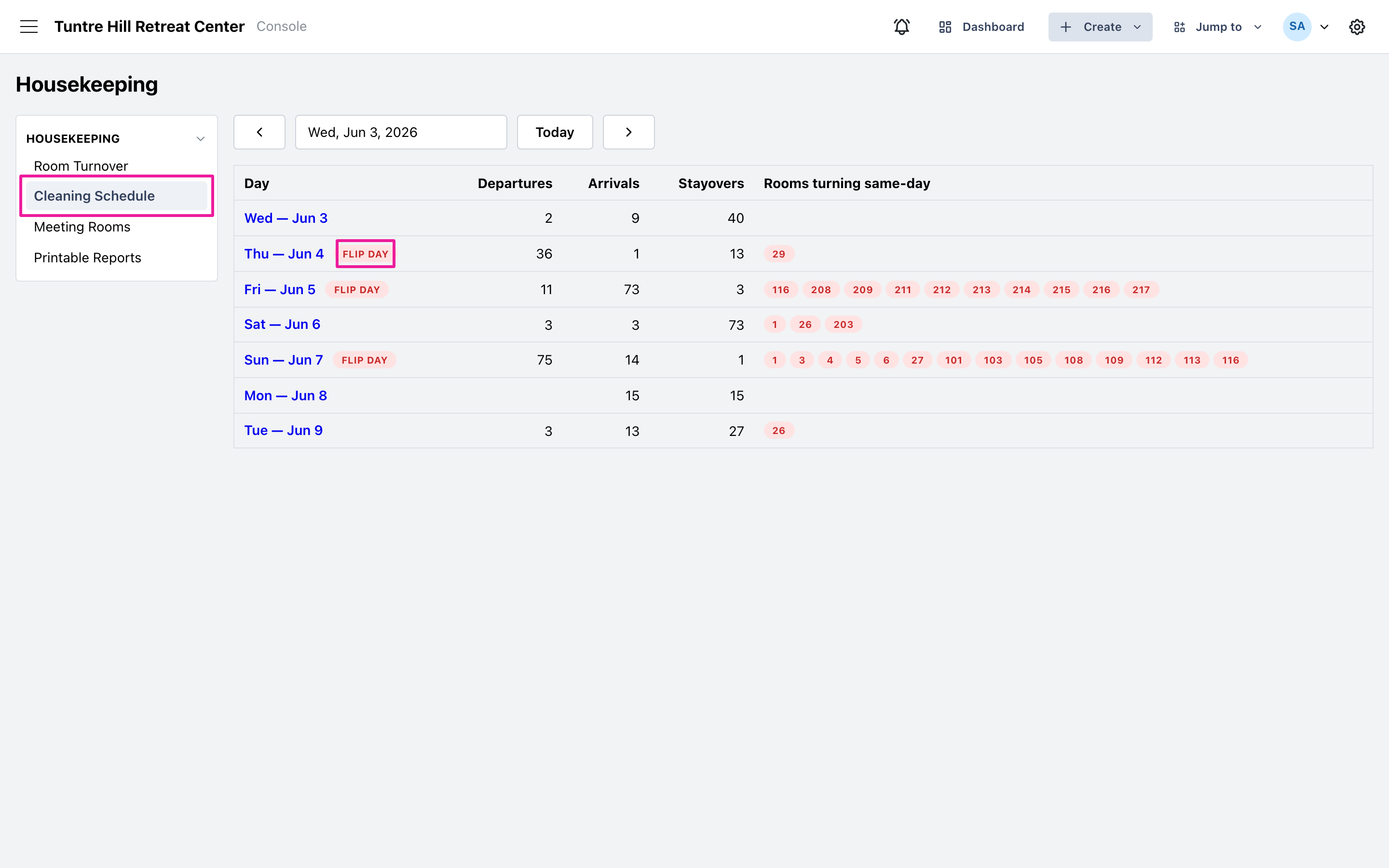
The Cleaning Schedule looks ahead: how many departures, arrivals, and same-day turns land on each day of the week. Because it’s built from reservations, next week’s workload is already there — use it to plan staffing and linens before a big changeover, not after it arrives.
Read the week
Section titled “Read the week”Click ‘Cleaning Schedule’ on the left. Each row is a day: departures, arrivals, stayovers, and the rooms that turn same-day — the rooms where one guest leaves and another arrives with a deadline in between. Heavy days carry a ‘Flip day’ badge, the days to staff up for. Click any day to open that day’s Room Turnover board, and use the date picker to look at any week.
What it won’t show
Section titled “What it won’t show”The schedule is a forecast, so it only counts what reservations can predict. Rooms left ‘Still dirty’ from earlier days aren’t in it — they belong to today’s work and appear on the board itself — and a guest re-booked into the same room doesn’t count as a turn, because nobody actually leaves. The day’s board is always the complete answer for “what do we clean today.”